
DiffusionGemma is a block-diffusion language model. Unlike an autoregressive (AR) model that generates one token at a time from left to right, a block-diffusion model fills in a block of response tokens (a canvas) by iteratively denoising the canvas. The canvas starts as uniform-random vocabulary tokens and is refined over several passes, conditioned on the prompt.
This guide covers Supervised Fine-Tuning (SFT) of the DiffusionGemma 26B-A4B model, which is a mixture-of-experts (MoE) model with 26B total and approximately 4B active parameters, using NeMo AutoModel with both full fine-tuning and Low-Rank Adaptation (LoRA).
The released checkpoint is available on the Hugging Face Hub:
google/diffusiongemma-26B-A4B-it.
| Step | What You Do |
|---|---|
| 1. Install | Install NeMo AutoModel using uv or a container |
| 2. Configure | Select an example YAML configuration file for full SFT or LoRA, and specify your dataset |
| 3. Train | Launch training with torchrun on eight GPUs |
| 4. Inspect | Read the training and diffusion loss curves |
DiffusionGemma combines a causal encoder and a bidirectional decoder on a shared backbone:
The DiffusionGemmaSFTRecipe implements the following training mechanics:
dllm.eps defaults to 0.001). Supervised
canvas positions are independently replaced with uniform random vocabulary tokens.
There is no [MASK] token.encoder_loss_weight defaults to 1.0). Total loss is diffusion CE
plus encoder AR CE.self_conditioning_p (default 0.5), each
example feeds those logits into pass 2.mask_history: true supervises only the final response turn.The example recipes run with Fully Sharded Data Parallel 2 (FSDP2) and expert parallelism (EP=8), mixed precision (FP32 master weights and BF16 compute), and a canvas and block size of 256.
DiffusionGemma SFT runs on a single eight-GPU node (EP=8). Two example configuration files
are provided in the examples/dllm_sft/ directory:
| Configuration File | Description |
|---|---|
diffusion_gemma_sft.yaml | Full fine-tuning on the GSM8K dataset |
diffusion_gemma_lora.yaml | LoRA fine-tuning (attention and dense-MLP linears; rank 16) |
Both configurations automatically pull the checkpoint from the Hugging Face Hub
(google/diffusiongemma-26B-A4B-it). Because the GSM8K dataset is consumed in the OpenAI
chat-messages format, you must generate the JSONL file (./gsm8k_chat_train.jsonl) before
launching training:
python examples/dllm_sft/prep_gsm8k.py
The recipes also set chat_template to
diffusion_gemma_chat_template.jinja.
The released DiffusionGemma chat template has no Jinja generation tags, so without this
copy the supervised region would start at the model turn header and teach the model to
re-emit it.
To run full SFT:
torchrun --standalone --nproc-per-node=8 \
    examples/dllm_sft/finetune.py \
    -c examples/dllm_sft/diffusion_gemma_sft.yaml
To run LoRA:
torchrun --standalone --nproc-per-node=8 \
    examples/dllm_sft/finetune.py \
    -c examples/dllm_sft/diffusion_gemma_lora.yaml
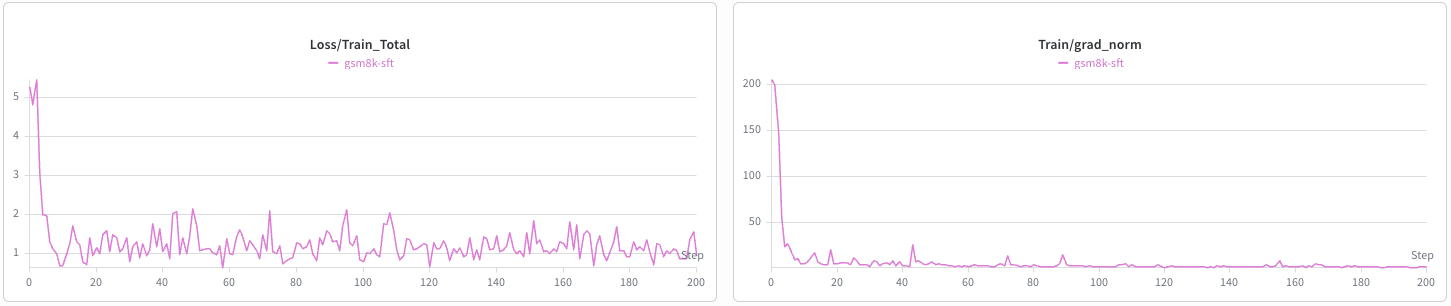
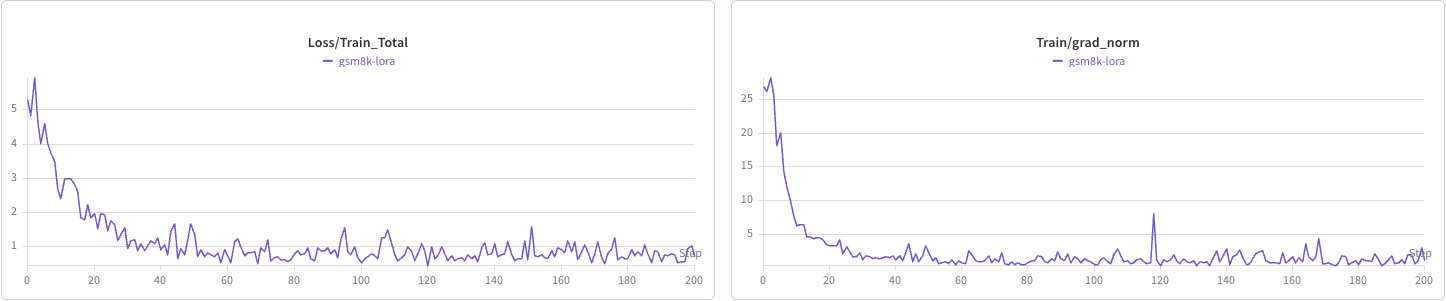
The following figures show the SFT and LoRA training curves on the GSM8K dataset for the first 200 steps.
SFT training curves:
LoRA training curves:
 View on GitHub