
Choose a model and spin it up locally on your NVIDIA system for privacy, control, and unlimited free experimentation without any token anxiety.
Most users will not require this playbook. Apps that use local AI will often configure a model for you. Follow this playbook when you want to download and run a local model yourself.
The NVIDIA Local AI Inference Recipes for RTX Spark currently recommends Qwen3.8-27B. This playbook uses that model throughout.
Here are the recommended models based on the available VRAM on your system:
| Target VRAM | Recommended LLM |
|---|---|
| 8–16 GB | Qwen 3.5 9B |
| 16–24 GB | Qwen 3.6 35B |
| 24–48 GB | Qwen3.8 27B |
| 48–128 GB | Qwen3.8 27B |
| 128–256 GB | Qwen3.8-Flash-Next |
| 256–384 GB | DeepSeek V4 Flash 0731 |
| 384–500 GB | GLM5.3 Flash |
| 500 GB+ | GLM 5.3 |
C:\llama.cpp.llama-server.exe, llama-cli.exe, and the CUDA runtime files, including cudart64_*.dll, are directly inside C:\llama.cpp. Windows must be able to find the CUDA DLLs beside the llama.cpp executables.llama-server.exe in File Explorer. Click the address bar, type powershell, and press Enter..\ prefix tells PowerShell to use llama-server.exe from the current folder..\llama-server.exe -hf "unsloth/Qwen3.8-27B-GGUF" `
-hff "Qwen3.8-27B-UD-Q4_K_M.gguf" `
--mmproj-url "https://huggingface.co/unsloth/Qwen3.8-27B-GGUF/resolve/4ca720788d1e01f1bff70c033e0d0028fd02e502/mmproj-F16.gguf" `
--host 127.0.0.1 `
--port 9931 `
--batch-size 4096 `
--ubatch-size 512 `
--ctx-size 262144 `
--parallel 1 `
-ngl 999 `
--spec-type draft-dflash `
--spec-draft-n-max 7 `
-hfrd "incoai/Qwen3.8-27B-DFlash2-GGUF" `
--spec-draft-model "Qwen3.8-27B-DFlash2-Q4_K_M.gguf" `
--spec-draft-backend-sampling `
--temp 1.0 `
--top-p 0.95 `
--top-k 20 `
--min-p 0.0 `
--presence-penalty 0.0 `
--repeat-penalty 1.0
During DFlash startup, llama.cpp may print a red line that begins failed to initialize the context: dflash requires ctx_other to be set, followed by failed to measure the memory of the extra model, fitting without it. The first line says the warning is normal during memory fitting. These messages are an expected memory-fitting probe, not a failed launch. Continue waiting until the server reports that it is listening on http://127.0.0.1:9931. If the process exits or never reports that it is listening, the server did not finish starting.
After launch, navigate to http://127.0.0.1:9931 in your preferred browser and send a message in the web UI.
Services that support OpenAI-compatible APIs can use the base URL http://127.0.0.1:9931/v1. To verify that endpoint directly, open a second PowerShell window and run:
'{"model":"unsloth/Qwen3.8-27B-GGUF","messages":[{"role":"user","content":"Hello"}]}' | curl.exe 'http://127.0.0.1:9931/v1/chat/completions' -H 'Content-Type: application/json' --data-binary '@-'
The response should contain a reply from the model.
Download and run the LM Studio Bionic installer for Windows. Bionic is a separate app from classic LM Studio; use the Bionic installer for this workflow.
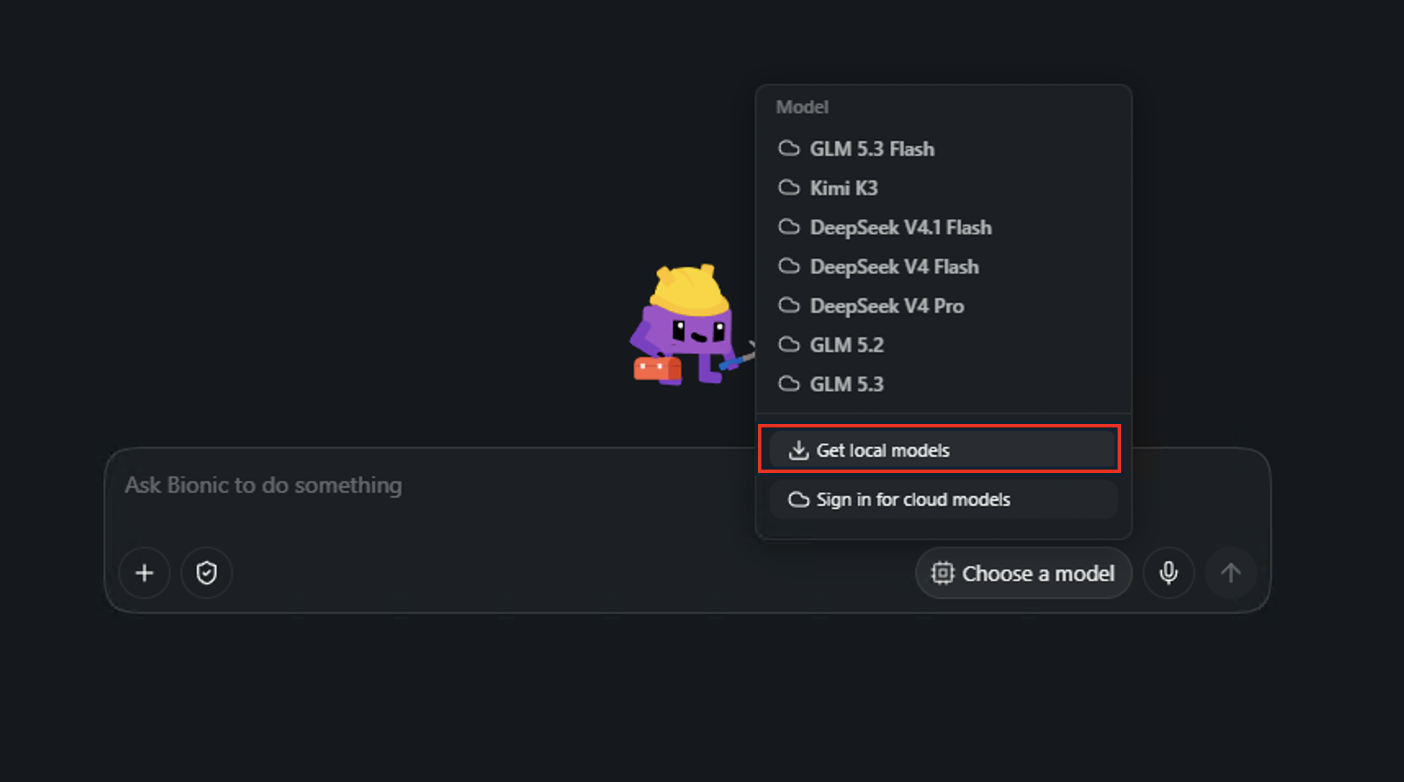
GGUF Q4_K_M variant, and then select Download.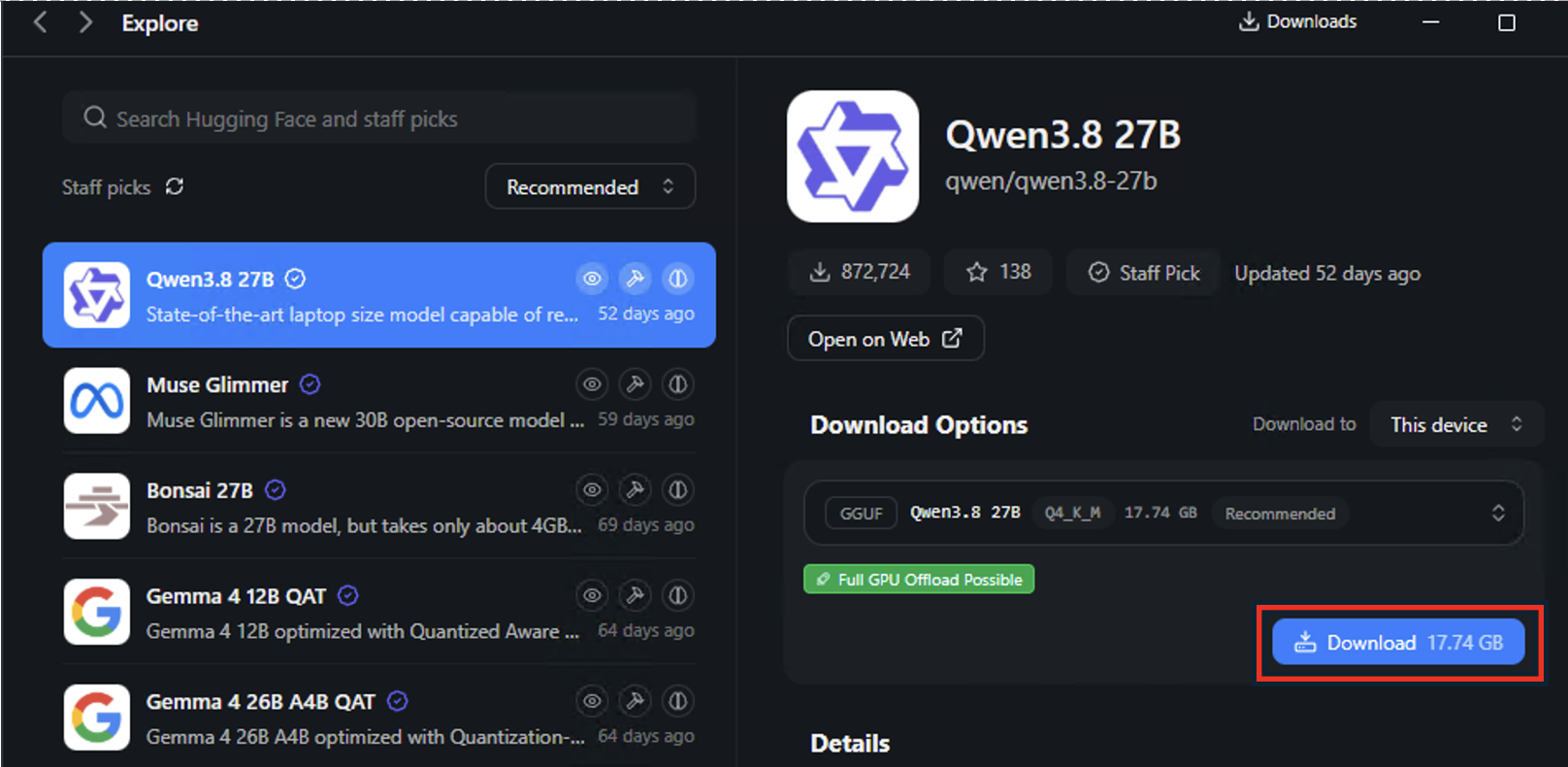
Enter a message in the Bionic session. A response confirms that the local model is ready to use.
irm https://ollama.com/install.ps1 | iex
After installation, Ollama starts automatically in the background and serves its local API on http://localhost:11434. You do not need to run ollama serve or reopen the app.
Download the recommended Qwen3.8-27B model:
ollama pull qwen3.8:27b
When the download completes, ollama ls should list qwen3.8:27b. The Ollama tag already packages the Q4_K_M model and its Ollama parameters. You do not need to copy the llama.cpp launch recipe or choose a separate quantization. Other models are available in the Ollama model library, but this playbook uses Qwen3.8-27B consistently across all three backends.
Start an interactive chat with the downloaded model:
ollama run qwen3.8:27b
Type your prompt or question and press Enter.
Downloaded models remain on disk so you can reuse them without downloading them again. When you finish, stop only the backend you started:
| Backend | Stop the model or service | Process and port | Downloaded model files remain in |
|---|---|---|---|
| llama.cpp | Press Ctrl+C in the PowerShell window running the server. If that window is unresponsive, end llama-server.exe in Task Manager. | llama-server.exe on 127.0.0.1:9931 | %USERPROFILE%\.cache\huggingface\hub, unless you configured a different Hugging Face or llama.cpp cache location |
| LM Studio Bionic | Close the Bionic app. | LM Studio Bionic desktop process; no API port is opened by the steps in this playbook | Bionic's local model library; open Settings > Local Models > Library to manage downloaded models |
| Ollama | Run ollama stop qwen3.8:27b to unload the model. To stop the background service, quit Ollama from its taskbar icon. | Ollama background app on 127.0.0.1:11434 | %USERPROFILE%\.ollama\models, unless OLLAMA_MODELS points elsewhere |
Stopping a backend frees the memory and port it was using; it does not delete the downloaded model. Delete a model from the backend's model library or cache only if you want to reclaim disk space.